15% OFF on All Products. Use Coupon code: FME15OFF2026





Call For Price for Magento 1










Hide prices and enable enquiry with powerful Magento call for price extension.
- Hide price & replace “Add to Cart” with custom button
- Display popup form for price enquiry
- Create multiple conditional rules with priority
- Restrict by customer groups & store views
- Manage and reply to enquiries from back office
- Configure automated email notifications
- Description
- Reviews
- FAQS
- Customization
- Change Log
Key Benefits of Magento Call for Price

Increase Direct Sales Enquiries
Encourage customers to contact you and negotiate before purchasing high-value products.

Control Pricing Visibility
Hide sensitive pricing for wholesalers, VIPs, or selected product categories.

Capture Qualified Leads
Collect verified customer details for future marketing and sales follow-ups.
Detailed Features of Magento Call for Price Extension
Hide Price & Replace “Add to Cart”
The Magento call for price extension allows you to hide product prices and replace the default “Add to Cart” button with a customizable “Call for Price” or “Ask for Price” button. This is ideal for configurable, custom, wholesale, or high-ticket products where pricing depends on specific requirements.
Display Popup Enquiry Form
When customers click the button, a stylish popup form appears to submit their enquiry. The form allows customers to ask questions, request quotes, or negotiate pricing directly from the product page. This makes the magento call for price functionality seamless and conversion-focused.
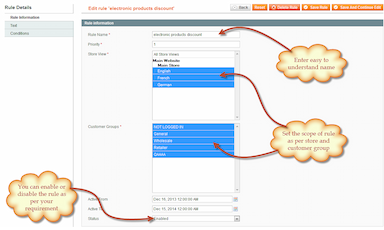
Create Multiple Rules with Conditions
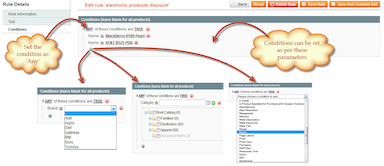
You can create multiple rules to control where and when prices are hidden. Using catalog price rule logic, the Magento ask for price feature allows you to:
- Apply multiple conditions
- Set rule priority
- Enable/disable rules easily
- Combine conditions with TRUE/FALSE logic
This ensures complete flexibility in price visibility management.
Hide Prices for Specific Products & Time Period
Choose specific products, categories, or apply rules for a defined time period. This is useful for:
- Seasonal campaigns
- Pre-launch products
- Limited-time wholesale offers
- Custom quotation-based products
Restrict by Customer Groups & Store Views
Control which customers can see prices. You can restrict functionality based on:
- General customers
- Wholesalers
- VIP members
- Private sales representatives
The Magento Call For Price extension fully supports multi-store environments, allowing different pricing strategies per store view.
Customize Button Text & Tooltip
Edit the “Call for Price” button text to match your branding. You can also:
- Add custom tooltips
- Display custom success/failure messages
- Customize popup headings
This ensures a consistent and professional store appearance.
Make Form Fields Optional or Mandatory
Control the information you collect by marking fields as optional or mandatory. This helps you gather essential customer details such as:
- Name
- Phone number
- Country
- Custom message
Perfect for building a strong sales pipeline.
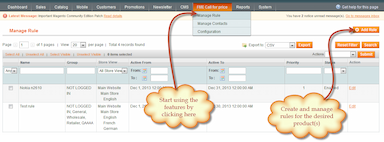
Manage Price Enquiries from Back Office
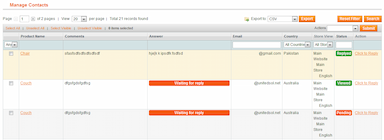
All customer enquiries are stored in a structured admin grid. The grid displays:
- Product name
- Customer comments
- Admin reply
- Email address
- Country
You can view details and reply directly from the backend.
Reply from Admin Panel
Respond to customer enquiries using custom subject lines and messages. This keeps communication centralized within Magento and improves response efficiency.
Email Notifications
Admin Notifications
Receive instant email alerts whenever a customer submits a price enquiry. Configure sender and receiver email IDs easily.
Customer Notifications
Customers receive:
- Confirmation email upon enquiry submission
- Notification email when you reply
You can customize all email templates and sender identities.
Additional Features
- Display for specific time periods
- Supports multi-store view
- Set rule priority
- Customize success & failure messages
- Display custom tooltip on button
Zain Rhemtulla
5Thanks for this great extension.
Excellent, thank you so much! bsjfixings.com
Colin
5Thanks
Thanks. Seems OK but will come back to you if we discover a problem. cheshirestoveshop.co.uk
Shelby
5Thanks
Thanks. Seems OK but will come back to you if we discover a problem. cheshirestoveshop.co.uk
niel
4works well
works well out of the box and support helped me with getting it integrated with a theme i got from TF. Def coming back for more. Almost forgot to mention. I had these guys do some custom work after they helped me with installing the extension. They were right on time with good hourly rates
willwatson : I'm a merchant, I useCommunity 1.8.1
5Great customer support and extension!
I had specific needs to implement this extension and the customer support worked with me to fit it exactly to my website's needs. Great extension and the customer service staff are on point! -- Source: Magento Connect