Magento 2 Mini Cart Extension - User Guide
General Configurations
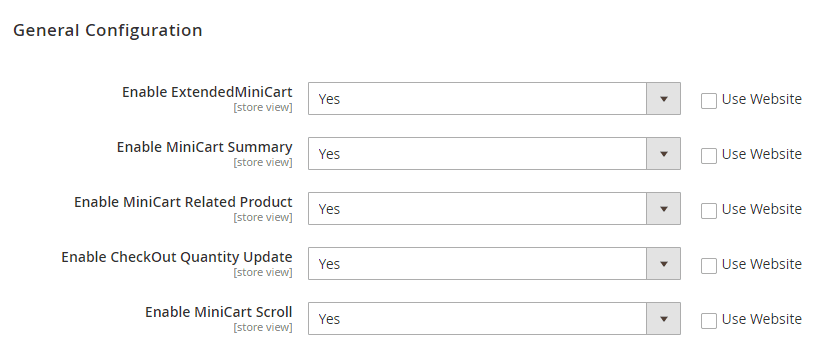
At the backend, go to FME EXTENSIONS > Configurations. Here you can find the extension configurations.
- Enable Extended Mini Cart: Option to enable or disable the module.
- Enable Mini Cart Summary: Option to enable or disable the mini cart summary.
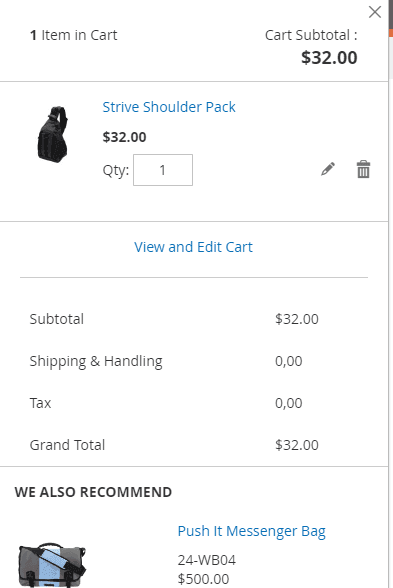
Note: This extension does not calculate tax and shipping values in the mini cart. These values will be calculated on the checkout page, with tax and shipping assumed to be 0 in the mini cart.
- Enable Mini Cart Related Product: Option to enable or disable mini cart related products.
- Enable Checkout Quantity Update: Option to enable or disable checkout quantity update. It allows the user to add/subtract order quantity at the checkout page.
- Enable Mini Cart Scroll: Option to enable or disable mini cart scroll.
Frontend
Go to the cart page to see different options added by the extension as shown below.
GraphQL APIs
1. Get Mini Cart Configuration Data
query
{
	extendedMiniCartGraphQl
             {
		  enable_extendedminicart
		  enable_extendedminicart_hyva
		  enable_minicartsummary
		  enable_minicartreleated
		  enable_minicartqtyupdate
		  enable_minicartautoscrol
	     }
}
