Magento 2 Limit Quantity Per Category - User Guide
At the backend, go to FME EXTENSIONS > Configurations. Here you can find the extension configurations.
Configurations
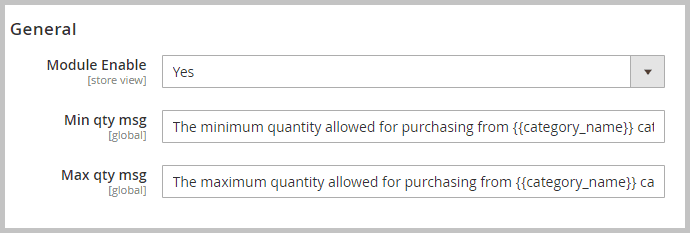
- Module Enable: Select ‘Yes’ or ‘No’ to enable or disable the module.
- Min Qty Msg: Write a custom message for minimum quantity requirement. You can make use of category and product attributes for auto-fetching data.
- Max Qty Msg: Write a custom message for maximum quantity limit. You can make use of category and product attributes for auto-fetching data.
-
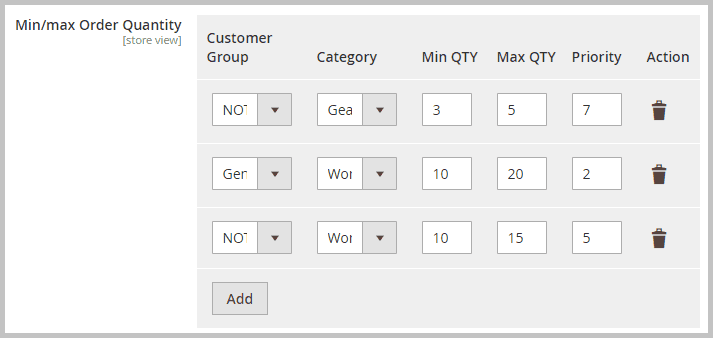
Customer Group: Select the desired Customer Group from the dropdown to which you wish to apply the quantity cart limit.
- Category: Select the category to apply the order quantity restrictions.
- Min Qty: Add a minimum order quantity requirement for the category.
- Max Qty: Set a maximum order limit for the category.
- Priority: Set a priority for this rule, with 1 as the highest and 0 as the lowest.
- Action: You can delete any rule from the trash icon displayed against each rule.
-
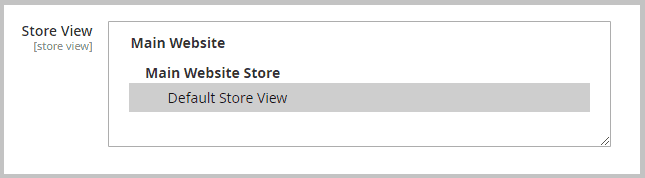
Store View > Apply the configurations to specific store views.
- Save Configurations.
- Refresh Cache.
