Magento 2 Background Images Extension - User Guide
At the backend, go to FME EXTENSIONS > Configurations. Here you can find the extension configurations.
General Configurations
- Enable Background Images: Enable/Disable the background images module

How To Manage Background Images?
At the back end, go to FME EXTENSIONS > Manage Background Images. Here you will find the grid will all the background images. Click on the Edit button or click on Add New Image button to continue.
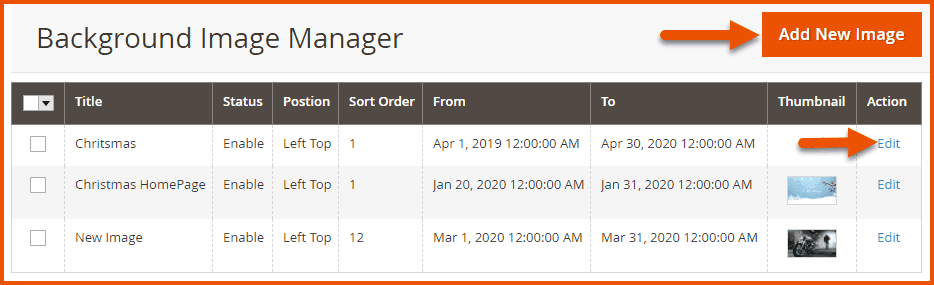
Background Image Details
- Title: Enter a title for the background image
- Image Priority: Set background image priority
- Status: Enable/Disable the background image
- Select Type: Choose the type of as
- Image
- Color
- Image: Upload a custom background image or select any image from the gallery (Note: Maximum file size is 2 MB)
- Date From: Select the start time period from which the background image will be displayed on the frontend
- Date To: Select the end-time period from which the background image will remove from frontend
- Category: Select any category/categories on which this custom background image will be shown
- CMS Pages: Select any CMS Page/Pages on which this custom background image will be shown
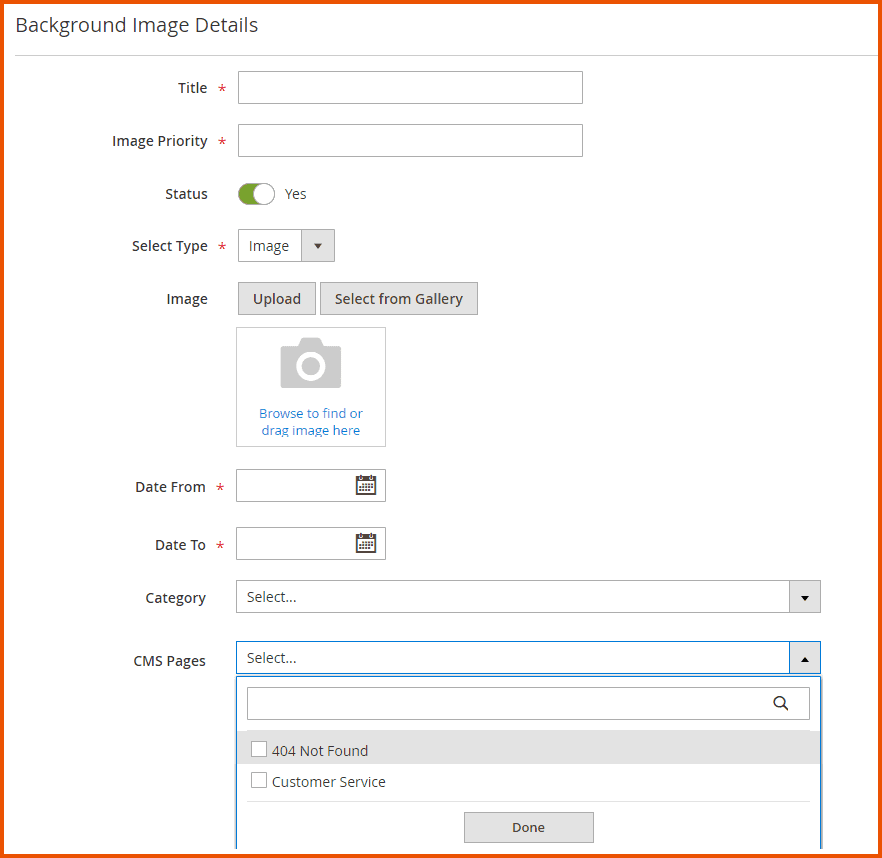
Background Image Styling
-
Position: Set position of the background image
- Left Top
- Left Center
- Left Bottom
- Right Top
- Right Center
- Right Bottom
- Center Top
- Center Center
- Center Bottom
-
Size: Set size of the background image
- 1000px 1000px
- 750px 750px
- Vertical Banner
- Horizontal Banner
- Full Screen
- Cover
-
Attachment: Specify the attachment style as
- Scroll
- Fixed
- Local
- Initial
- Inherit
-
Repeat: Choose repeat type
- Repeat
- Repeat-X
- Repeat-Y
- No Repeat
- Space
- Round
- Initial
-
Clip: Choose the clip style
- Border Box
- Padding Box
- Content Box
- Initial
-
Origin: Choose the origin style
- Padding Box
- Border Box
- Content Box
- Initial
- Inherit
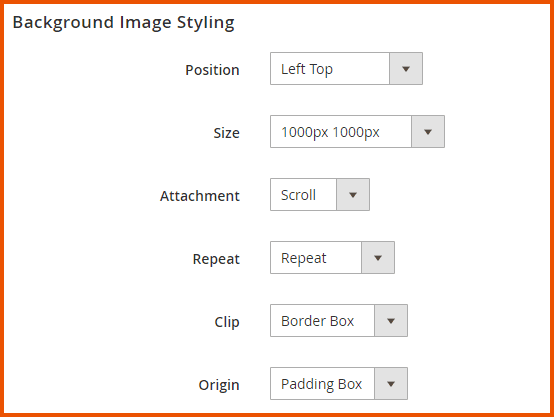
Select Products
Select any product/products on which this custom background image will be shown
GraphQL APIs
1. The following GraphQL query retrieves background image configuration for a specific product by ID. It returns styling-related attributes such as image, color, size, and CSS background options. Useful for rendering dynamic product backgrounds based on settings in the backend.
Query
{
  backgroundImageByProduct(product_id: 1) {
 backgroundimage_id
 title
 status
 postion
 background_type
 sort_order
 date_from
 date_to
 image
 color
 attach
 size
 repeat
 clip
 origin
  }
}
2. The following GraphQL query fetches background image settings for a specific category using category_id. It returns visual and layout properties like image, color, position, and display rules. Ideal for applying customized backgrounds to category pages based on admin-defined data.
Query
{
  backgroundImageByCategory(category_id: 5) {
 backgroundimage_id
 title
 status
 postion
 background_type
 sort_order
 date_from
 date_to
 image
 color
 attach
 size
 repeat
 clip
 origin
  }
}
3. The following GraphQL query retrieves background image settings for a CMS page using its identifier (e.g., "home"). It includes visual styling details such as image, color, positioning, and CSS-related options. Useful for dynamically rendering backgrounds on CMS pages based on configured settings in the backend.
Query
{
  backgroundImageByCms(cms_identifier: "home") {
 backgroundimage_id
 title
 status
 postion
 background_type
 sort_order
 date_from
 date_to
 image
 color
 attach
 size
 repeat
 clip
 origin
  }
}
