15% OFF on All Products. Use Coupon code: FME15OFF2026





Price Calculator for Magento 1




- Price Based on Length, Width, Height
- Dynamic Pricing Formula for discounts
- Configure Per Unit Price & Base Price
- Supports Multiple Input/output Units
- Description
- Reviews
- FAQS
- Customization
- Change Log
POWERFUL FEATURES OF MAGENTO DYNAMIC PRICING CALCULATOR
Magento Full Page Cache helps optimize Magento speed by caching store pages. It reduces the load time, the server load, which helps ranking high at Google, and ultimately increasing the sales.

Price Per Unit
You can configure Magento price per unit depending on the product.

5 Input & Output Units
Price calculator supports 5 different units of measurement to calculate price for customers.

Dynamic Pricing Formula
Make your own dynamic Pricing rules to sell your variable sized products.

Price Based On Area / Volume
Allow customers to purchase products with respect to Area and Volume.

Pricing With Discounts
Offer your customers attractive discounts based on size of product being purchased.

Fixed Base Price
Add a fixed base price on each of your products
Use cases of Magento Price Calculator?
Do you sell products in measurements like area, square foot, volume, or weight? Here are some examples where you can use measurement pricing.
- Tiles sold in square feet
- Variable mulch sold in the cubic yard
- Fabric in meter or yard
- Blinds sold in length and width
- Flooring sold in Square feet
- Liquids sold in volume
- Wallpaper sold based on wall dimensions
- Printing and Banners store
Foam sold in the cubic foot - Fencing for house, garden, etc
- Wrapping paper sold according to surface area
- Educational tutorials or lectures sold by per hour
- And more…

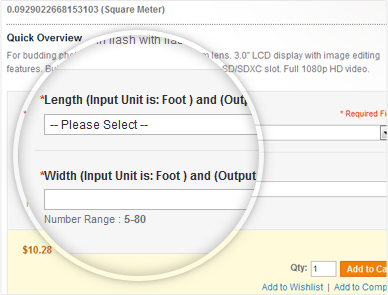
How does Pricing Calculator Work?
Here are the 3 easy steps with an example to show you how do this dynamic pricing Magento extension works.
Step1: Set Price per Unit
The first thing the merchant needs to do is to set the per unit price of each product. The unit can be selected from backend like price per centimeter, millimeter, foot, inch or meter etc.
Step 2: Create Input Fields for Customer
The merchant then configures the input fields such as length, width, height, weight depending on each type of product from back end.
Step 3: Let Customers Put The Measurement Value
Once the customer inputs the measurement value like length, width and height of the product, this extension automatically calculates the total price of the product that customer can add to cart and checkout. The price will change as the customer changes the measurement values.
Discount Options in Price Calculation
Apply discount rules to your variable sized products for better sales revenue from your store.
Discount based on size
You can set the different discounts for customers based on the size of product they purchase. This encourages customers to purchase more in order to acquire discounts.
Fixed / Percentage discount
The type of discount offered to the customers can be changed as fixed or percentage depending on the product.
Show / Hide Discount On Front End
This feature allows you to display or hide discounts on the front end as per your requirements. By showing the discounts you encourage the customer to purchase more from your store.
Dynamic Pricing Formula
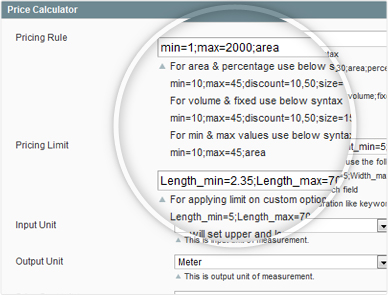
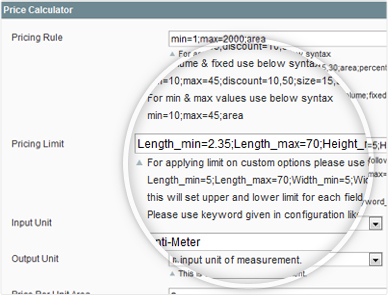
You can define your own dynamic pricing formula to determine final price of products when customers purchase them with respect to size.
Here is an example of formula for Magento Dynamic Pricing
min=10;max=45;discount=10,20;size=15,30;area;percent;
This rule defines following;
- Min and Max shows the size range,
- Two discounts; 10% for sizes between 15 – 30 and 20% for sizes above 30.
- Area and Volume of the products can be priced
- Discounts are set as fixed or in percentage values.
Add Fixed Base Price
You can set a base price for every product that will remain fixed in price calculation
Show / Hide Base Price
mThe base price at the front end can be hidden after the customer enters the measurements and the final price is shown.
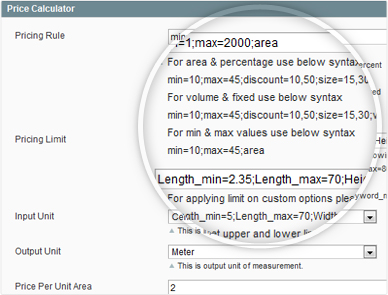
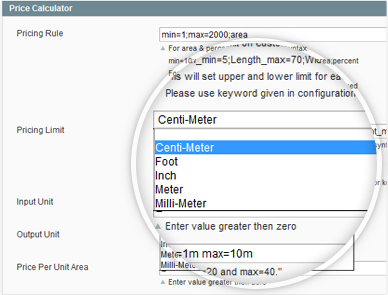
Supports Multiple Units
Customers can enter their measurements in appropriate units suitable for the product.
- Centimeter
- Inch
- Foot
- Meter
- Millimeter
More Features
Here are rest of the features of Price Calculation extension
- Product Price is dynamically updated based on input values
- Multiple Input and output size units are supported such as Meter, Centimeter,
- Millimeter, Inch etc.
- Decimal and Integer input values are supported
- Applies percentage and fixed discount for different product sizes
- Custom Validation messages when custom enters measurement
- Supports group pricing
- Multi Stores Supported
- Step by Step Installation guide included
- Complete user manual for product use
Merchant Benefit
- You can sell products in larger quantities with attractive discounts. Discounts can be shown on the front end which encourages customers to purchase more quantity from your store.
- Pricing rules allow you to optimize products available in various sizes such as fences and liquids. This allows you to prevent giving away extra amounts to the customer for free.
- By applying square foot pricing formula you can restrict the minimum and maximum size of product to be purchased. This is effective for several types’ products that cannot be sold in smaller or larger sizes.
Customer Benefit
- Price calculator Magento extension gives your customers an easy to use price calculation tool to find the exact price of the variable sized products without any technical knowledge.
- Through Pricing Calculator, customers can save their money by getting the precise sizes of the products instead of paying extra for the amount they don’t need.
When the customers need to purchase merchandise in greater amounts, the pricing rules offer discounts. The discount increases as quantity / size increases. - Purchasing a carpet roll in between 20-40 feet will give 10% discount and if more length is added from 40-80 feet then 15% discount will be applicable. Different discounts can be set on different sizes.
nk
5Great support
I have only good words for the FME team.. There were some serious conflicts with the theme and some other extensions I was using, but the support team solved them as fast as possible, and patiently answered all my questions. I highly recommend FME.
Spletnik
4Great support team
We used this extension on one of our webstores and had some issues at first, due to older version of Magento. But FME team did a great job supporting us and helped resolve us all open issues. They have realy fast response times :) Realy great job FME and realy great extension. Best regards
Maarten J
5Thanks
Works perfect, thanks for the support! Site: vivol.de
Cathrine
5Hi,
Thank you :-) It works perfect now. Regards Cathrine - discountprint.dk
Markus
5FME’s team is dynamic, works prompt and brilliant and guarantees perfect services.
FME’s mode of operation can be described in just a few words: FME’s team is dynamic, works prompt and brilliant and guarantees perfect services. Whatever you need in developing digital tools/ extensions, FME will succeed in editing it. Some weeks ago our company ordered a pricing calculator extension from FME. We produce and sell antique timber articles – for instance tables – and our customers should be enabled to choose all kinds of dimensions. Unfortunately problems arose, but FME were able to solve them in a short time and perfect manner. Later on some special supplements had to be added to the already mentioned pricing calculator extension. FME’s support team was contacted by me to programme an extra Magento Backend Input Box for tables of 245cm length and 120cm width, sold in our firm’s online shop. Three more days and the job was done. Now everything was okay. We were happy and very pleased. Many thanks from us and our purchasers to FME. It’s no problem for me to recommend FME. As already said FME works accurately and was able to satisfy our company 100%. I’m looking forward to our next project and cooperation! Greetings and best wishes from Austria!